
RADIO AUTOMATION IN THE CLOUD
Radio automationin the cloud.
Music, broadcast clocks, scheduling and playout in one system. Control your broadcast through your own connected GPT with typed or spoken instructions.
Full manual controls remain available.
NexRadioFORMAT / 60 MIN
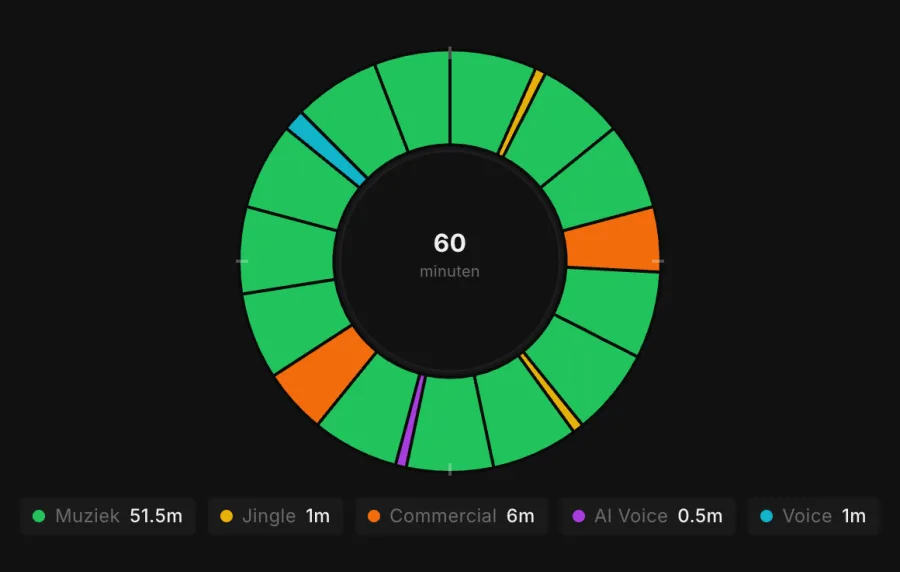
An hour built around your format.THE FOUNDATION OF YOUR BROADCAST
60′THE AUTOMATION SYSTEM
From your format to a complete broadcast.
Build a distinctive program with attention to every element.
01
Program with broadcast clocks
Define the structure of each hour. Give music, jingles and presentation their place within your format.
02
Scheduling and playout
Turn your format into a playlist and work with precise start, end and transition points for your broadcast.
03
Presentation that fits
Add announcements and other voice segments to your program. Listen to examples below.
YOUR OWN GPT AS THE CONTROLLER
Say what you want. NexRadio handles the execution.
Connect your own GPT to NexRadio. Describe how you want to structure an hour or which schedule you need. Your GPT passes the instruction to NexRadio, which executes it. Use your chatbot’s voice feature to speak the same instructions.
GPT → NEXRADIO
“Create the next hour’s schedule using my morning format.”
“Set up the next hour with more relaxed music and less presentation.”
Example instructions for your connected GPT. The connection is configured for your station.
Prefer to click? Broadcast clocks, schedules and settings remain available in the manual interface. Choose how you work for each task.
NEXRADIO IN PRACTICE
A few examples in action.
The first three are NexRadio Nederlands, NexRadio English and Coast Ibiza, our own demo stations; the others are customer stations. Click an app image to listen right here.
- DEMO NexRadio Nederlands Our own Dutch-language station: everything NexRadio can do, on air 24/7.
- DEMO NexRadio English Our own English-language station, on the same automation.
- DEMO Coast Ibiza Also ours: feel-good rock around the clock, on the same automation.
NexRadio English
Open website ↗Coast Ibiza
Open website ↗Radio Dreamscape
Open website ↗UberFM
Open website ↗Sub Sub Ibiza
Open website ↗JFK Ibiza
Open website ↗Ibiza Organica
Open website ↗Viva Libido Radio
Open website ↗Ibiza Workout Radio
Open website ↗Sam Ibiza
Open website ↗Forgotten Faces
Open website ↗Flower Power Radio
Open website ↗Choose a station to listen.
The app images are snapshots. You hear the current broadcast. Websites and listening apps are additional services for the radio automation system.
A few voices between the songs.
Just aired on NexRadio
Rick Vito taking us back to nineteen ninety-two with those sweet bluesy tones on Desiree. Now, as we head towards ten to six on this Friday afternoon, let's slow things down with a masterpiece from nineteen seventy-one. This next track was the title song of Bread's fourth studio album, and it went on to become one of their biggest chart successes, peaking at number three on the Billboard Hot One Hundred. It's a beautifully delicate acoustic ballad that feels like a warm breeze on a quiet evening. Here's Bread with Baby I'm-a Want You on NexRadio.
Chris Isaak just chilled Monday evening to the core with Wicked Game. A quick look outside: twenty-six degrees in Es Canar with partly cloudy skies. Bob and Earl are next on NexRadio with Harlem Shuffle.
Bruce Springsteen and Crowded House, both masters of capturing that raw, late evening melancholy. From the dark streets of New Jersey to the gorgeous melodies of Neil Finn, NexRadio keeps the mood flowing. Don't Dream It's Over is next.
Monday evening, and Chicago just swept us away with Baby, What a Big Surprise. One more before the top of the hour on NexRadio: Dolly Parton and Kenny Rogers. Then the news, and we check the weather for you.
Simple Minds almost rejected Don't You Forget About Me before it became their biggest hit. Welcome to this new hour of NexRadio Evenings, continuing our Monday night journey. Let's get right back to the music.
Who else gets chills from that soaring synth opening? Duran Duran with A View to a Kill. Next on NexRadio, we dive into the dark, cinematic world of Mick Jagger with Strange Game.
Lady Gaga just left us breathless with the cold, synthetic pulse of Paparazzi. One more sweet, acoustic slice of seventies heaven before the top of the hour: Bread with Make It with You. Then we have the news and a full weather update on NexRadio.
Phone conversations
AI recordings in the language of this page, made with the same rules as on air; the phone calls and the scripts are generated automatically by NexRadio, not real incoming calls.
Good to know.
Can I use my own music?
Your own library is the starting point. During the demo, we discuss your file formats, metadata and how to set up your music collection.
Can I switch with my existing format?
We review your library, hour clocks and current workflow. Then we agree on the setup, trial and switch.
Are music licences included?
Do not assume that a software subscription also covers music rights. The permissions you need depend on how you use the service and the countries where you broadcast.
What do I need to connect my GPT?
During setup, we configure the connection and permitted actions for your station.
How much does NexRadio cost?
You receive a proposal based on your station, storage, streaming capacity, AI usage and the guidance you need. No payments are taken automatically.
Explore your radio automation.
Discover what NexRadio can do for your station in a personal demo.
Book a demo
A personal demo. No payment details required.